
Ticketing and Queue Kiosk Hardware Requirements: A Spec Template for Transit, Clinic and Service Halls
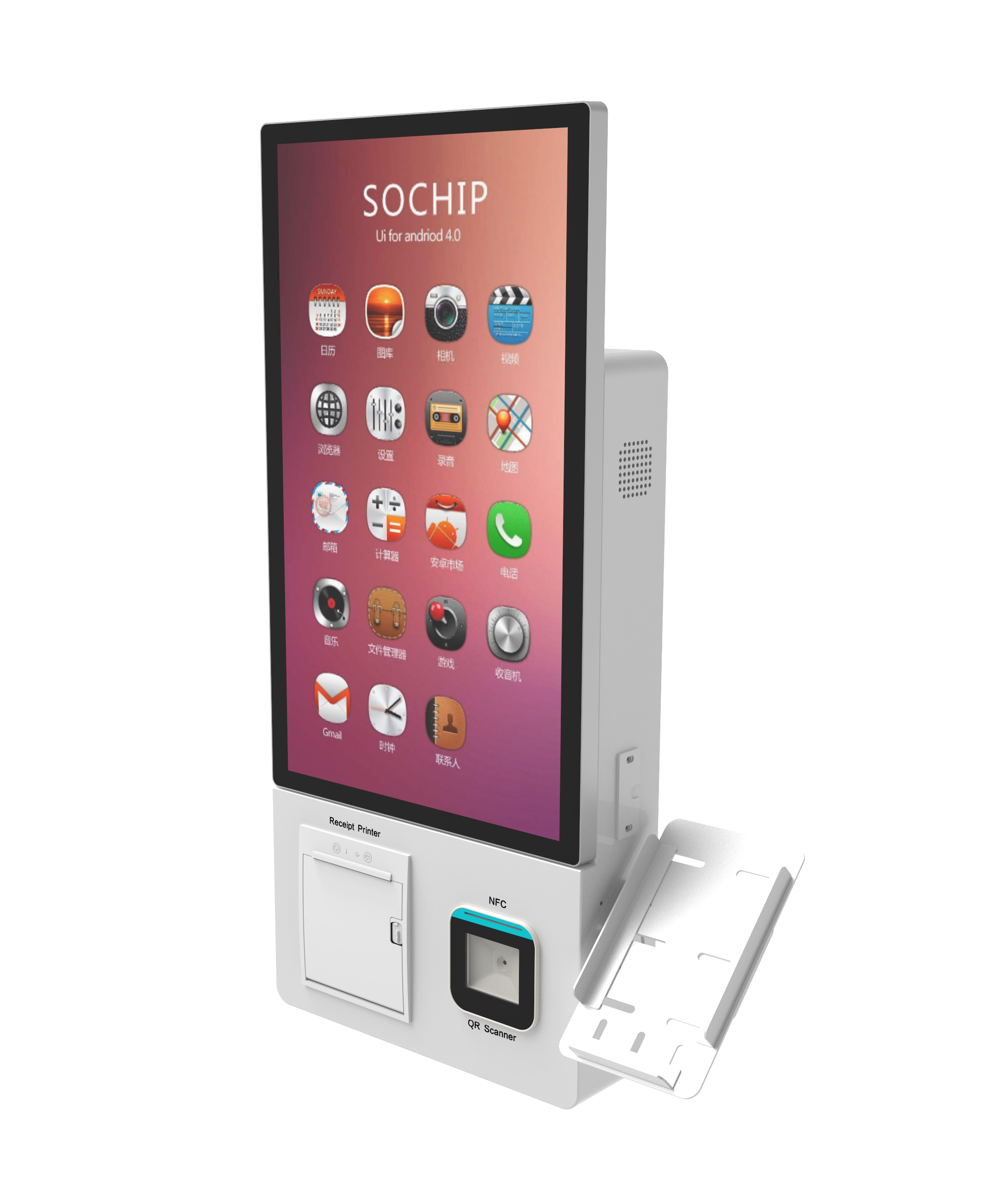
Ticketing and queue kiosk hardware requirements come down to five decisions: the task the user completes, whether a printer is needed, what the scanner or reader must cover, how the unit is mounted, and how a technician reaches the consumables. Settle those in order and the enclosure, screen and compute spec largely follow.
Ticketing and Queue Kiosk Hardware Requirements: What This Template Covers
This template scopes ticketing and queue kiosk hardware requirements into a short RFQ. It covers the enclosure and compute platform, thermal ticket printer and scanner modules, cash and cashless payment, mounting format, environmental rating and service access — in the order a site survey produces the answers.
An unattended self-service terminal is a kiosk that completes a transaction without staff intervention, which is why every peripheral in it must survive continuous public use rather than intermittent operator handling. The category is broad: a restaurant self-ordering kiosk, a hospital registration kiosk and a transit fare unit look similar from the outside but load different modules inside ([4]). Hardware has to be planned alongside the backend it reports to — POS, HIS, ERP, visitor or payment system ([4]). What follows is a self-service ticketing kiosk procurement checklist you can copy into a line-item document.
What Hardware Does a Ticketing Kiosk Actually Need?
A ticketing kiosk needs six functional blocks: enclosure and touchscreen, a compute platform, a printing module if tickets are issued on paper, a scanning or identity module, a payment module, and a network link. Indoor versus outdoor rating is a seventh decision that affects all of them.
- Enclosure and screen. Toughened PCAP touch glass in a steel or aluminium body; screen brightness varies from indoor panels to sunlight-readable units rated in nits.
- Compute platform. An industrial PC, or an Android, Windows or Linux board. This is where NPU and on-device inference sizing becomes a real cost line once the kiosk runs local vision or speech.
- Thermal ticket printer module. A drop-in print engine sized by paper width — 2-inch or 3-inch classes dominate kiosk, POS, banking and medical ticket-issuing work ([7]).
- Barcode and QR ticket scanner. Fixed-mount OEM readers that read 1D/2D barcodes and QR codes from paper, phone screens and wearables ([7]).
- NFC and cEMV contactless reader. Sometimes a separate module, sometimes combined with the barcode engine in one housing.
- Cash and cashless payment module. Banknote and coin recycling units sit alongside card readers on modular self-service kiosks that support both cash and cashless transactions ([7]).
- Network module. Ethernet plus Wi-Fi or cellular, chosen with the fleet-management and software interface in mind ([4]).
| Module | Function | Spec detail that decides it |
|---|---|---|
| Print engine | Issues the physical ticket | Paper width class, jam access panel |
| Scanner / reader | Reads the ticket medium | 1D/2D, RFID/NFC, cEMV in one housing or three |
| Payment unit | Takes the money | Cash recycling vs. cashless only, acquirer ownership |
Printer or No Printer — The First Fork in the Spec
Ticketing and queue kiosk hardware requirements diverge fastest here. A ticket-issuing kiosk needs a thermal ticket printer module that prints on demand, which means a consumable supply route, a paper-feed path and physical jam access a technician can reach. A queue-number kiosk can skip all of it.
| Dimension | Ticket-issuing kiosk | Queue-number kiosk |
|---|---|---|
| Output | Printed ticket, on demand | Digital ticket pushed to a phone |
| Consumables | Paper rolls, print-head wear | None |
| Failure mode | Jams, out-of-paper | App or SMS delivery |
| Handoff | Printed stub scanned at the gate or desk | Number called on a display board |
The decision rule: if the ticket number lives in a queue display and the user keeps a phone reference, the printer is optional. If the ticket is a fare or access token that a gate reads, the thermal print engine is not.
Ticketing Kiosk vs. Queue Management Kiosk: Where the Hardware Diverges
Queue management kiosk hardware is tuned for identification and dispatch, while ticketing hardware is tuned for transaction and settlement. Both may sit in the same concourse, but they load different peripherals, cope with different throughput rhythms and integrate into different systems.
| Dimension | Ticketing kiosk | Queue management kiosk |
|---|---|---|
| Workflow | Select, pay, issue token | Identify need, assign number |
| Dominant peripheral | Print engine plus payment | Scanner, reader, sometimes printer |
| Throughput pattern | Bursty before departures or events | Steady, matched to counters |
| Integration target | Fare system, POS, gate readers | Queue display and call system |
The practical consequence is that a queue kiosk can often be simplified into a touchscreen with a network link and maybe a small printer, which lowers both unit cost and service load. A ticketing kiosk carries payment and print, so its consumable route, security posture and payment certification dominate the spec. Vendors sell both under one solutions line precisely because the enclosure looks alike while the internals differ ([3]).
Scanner and Payment Modules: Matching Coverage to the Ticket Medium
For OEM ODM ticketing kiosk hardware, the scanner class is set by the ticket medium, not by preference. Combined modules now put barcode, RFID/NFC and cEMV in one low-profile housing, so the real question is coverage, not count.
- Paper 1D/2D barcode ticket — a fixed-mount OEM barcode reader; compact low-profile units suit slot-mounted integration ([7]).
- QR code on a phone screen — the same 1D/2D class, but it must read emissive screens and wearables, not only print ([7]).
- RFID or NFC token — an RFID/NFC reader; combined barcode and RFID/NFC readers cover both paper and token in one module ([7]).
- cEMV contactless card — a reader carrying EMV Level 2 certification for contactless payments, with PCI and SRED compliance for multiple card schemes ([7]).
Treat PCI-PTS and EMV Level 2 as procurement questions rather than assumed attributes. Modules of this class typically ship with SDK and API documentation and communication protocols for integration ([8]), but payment certification and acquirer ownership are contractual items you confirm in writing. Note that this article sets out a decision framework; it is not measured deployment data.
Floor-Standing vs. Wall-Mounted: Placement Drives the Spec
Floor-standing vs wall-mounted kiosk placement is decided by approach space and queue geometry, not by aesthetics. Placement affects kiosk structure, screen direction, accessibility and durability needs, which is why lobby, hospital hall and public service area are specified as separate installation environments ([4]).
| Site condition | Floor-standing | Wall or counter mount |
|---|---|---|
| Open concourse, long queue | Preferred — own footprint | Poor; blocks nothing but serves few |
| Tight corridor wall | Footprint intrusion | Preferred — reclaims floor |
| Wheelchair approach needed | Preferred — forward reach | Risky unless counter is low |
| Restricted after-hours access | Servicing is exposed | Preferred — harder to tamper |
- ADA screen reach: check the interaction zone against seated and standing user reach before fixing mounting height.
- Wheelchair approach: reserve a turning and knee-clearance zone in front of, not beside, the unit.
- Queue-line geometry: place the unit so users do not step into the circulation path of the counter queue.
- Service access clearance: leave enough depth for a technician to open the front or rear door with consumables in hand.
Pick floor-standing if the site has spare approach area and the unit is a primary service point. Pick wall or counter mount if floor space is the constraint and the transaction is short.
Throughput and Site Environment: Clinic Halls, Transit Concourses, Service Counters
Site character changes the spec more than throughput headcount does. Dust, temperature swing, privacy and assist flow each push a different field in the RFQ.
Transit concourses — transit ticketing kiosk specifications. A concourse brings moving air, dust and wide temperature swing, so the enclosure rating and display brightness become primary spec fields. Outdoors or in direct sun, 2026 procurement guidance points to an IP65 (or better) enclosure, a sunlight-readable display of at least 1500 nits, and an operating range around −20°C to +50°C with a touch panel that works through rain and gloves ([1]). Indoor concourse units can step down from those figures, but the rating field should still be stated, not left blank.
Clinic registration halls — clinic queue kiosk hardware requirements. Ambient conditions are benign, so the defining constraints are privacy and accessibility rather than ingress rating. Screen angle, audio volume and the position of any printed output matter when the next patient is standing two metres away.
Service counters. Here the kiosk assists a staffed counter rather than replacing it, so integration with the counter queue and display board carries more weight than raw transaction speed. Durable hardware and responsive touchscreens matter most where the unit faces real-world press of constant use ([5]).
The Spec Template: Turning a Site Survey into an RFQ Line Item
Converting a site survey into a ticketing and queue kiosk hardware requirements RFQ means answering ten questions in order, each producing a field. The rule for each is that an unanswered field becomes an assumption in the quotation, and assumptions are where change orders come from.
- Task and completion evidence. State what the user accomplishes and what proves it. Rule: one sentence, measurable.
- Ticket medium. Paper, phone QR, RFID/NFC token or cEMV card. Rule: list every medium the site intends to accept.
- Print required yes/no. Rule: yes only if the ticket must be physically presented elsewhere.
- Scan and identity modules. Rule: name the class per medium, including any ID or camera needs.
- Payment module ownership. Decide whether the PSP or acquirer supplies and certifies the payment unit. Rule: name the owner, not the brand.
- Mounting format. Floor-standing or wall/counter, with reach height. Rule: fix it from the approach-space drawing.
- Environmental rating. IP class, nits and operating temperature range. Rule: state indoor as explicitly as outdoor.
- Service access and consumable route. Door swing, paper-roll change path, lock type. Rule: specify technician clearance in millimetres.
- Fleet management expectation. Remote monitoring, software versioning and log retrieval. Rule: one agent standard across the fleet.
- Spare parts and preventive maintenance ownership. Print heads, rollers, scanners, cleaning cycle. Rule: assign each wear item to a named party.
Two of those fields link back to compute, not hardware. Modules of this class typically ship with SDK and API documentation and communication protocols ([8]), and the software layer decides whether you need an AI accelerator sized for compute headroom or can rely on the host CPU. If the pilot is a single-unit edge AI tablet deployment, settle the peripheral list first, and only then compare edge versus cloud processing for Android tablet fleets. Autonomous ticket-reading loads often justify a self-contained terminal, which is why [6] are commonly specified together with thermal printers and barcode scanners for ticketing and payment work. OEM and ODM programmes also scale from single prototypes to volume production ([2]), so the template should survive a pilot-to-fleet transition without a re-spec.
Content reviewed: 2026-09-13.
Evidence confidence
Confidence: Medium. This rating reflects cross-checking 8 sources across 7 independent domains. It measures evidence coverage, not certainty; verify safety-critical work against manufacturer instructions and local requirements.
References
APA 7th edition
- ↑Wintouchtech. (2026). Outdoor Self-Service Kiosk 2026 Procurement Spec · Wintouch. https://wintouchtech.com/en/blog/outdoor-self-service-kiosk-2026-procurement-spec-checklist/.
- ↑Aonkiosk. (2026). Self-Service Kiosk Buying Guide: Prototype to Mass Production. https://aonkiosk.com/self-service-kiosk-buying-guide/.
- ↑Queue Management Kiosk. (n.d.). Ticketing Kiosk Solutions. Retrieved September 13, 2026, from https://aonkiosk.com/solutions/ticketing-queue-management-solutions/.
- ↑Cited 4 timesIkinor Interactive. (n.d.). Self-Service Kiosk. Retrieved September 13, 2026, from https://ikinor-interactive.com/self-service-kiosk.
- ↑Flytech. (n.d.). Queue Management Made Simple with Self-Service Kiosks. Retrieved September 13, 2026, from https://www.flytech.com/en/blog.php?act=view&id=23.
- ↑ODM/OEM Customization. (n.d.). PENETEK Self-Service Kiosks | Interactive Touch Kiosks. Retrieved September 13, 2026, from https://www.penetek.com/en/category/Self-Service_Interactive-Kiosks.html.
- ↑Cited 7 timesKiosk Marketplace. (n.d.). Ticketing Kiosks Products & Services. Retrieved September 13, 2026, from https://kioskmarketplace.com/companies/products/category/ticketing-kiosks.
- ↑Cited 2 timesCustom Self-. (n.d.). OEM/ODM Kiosk Hardware Solutions. Retrieved September 13, 2026, from https://www.snroprinter.com/oem-odm-kiosk-hardware-solutions.
You should also read:
On-Device vs Cloud AI for 2026 Self-Service Kiosks: An NPU Sizing Guide
On-Device Vs Cloud Ai For 2026 Self-Service Kiosks is the decision framework examined in this guide. The sections below turn sourced evidence into practical comparison criteria without overstating what the available research can prove. For 2026 self-service kiosks, the on-device vs cloud AI line is…
Continue reading...
Edge AI NPU Sizing for Voice-Activated Kiosks
Edge AI NPU sizing for voice-activated kiosks starts with your voice workload, not a headline TOPS number: a single-unit pilot needs roughly 3-30 TOPS depending on whether it only listens for a wake word or runs full local speech recognition. The rest is RAM, storage,…
Continue reading...
Edge-AI vs Cloud on Rugged Mobile vs Fixed Kiosks: Sizing On-Device Compute Across the 2026 Device Mix
For a 2026 kiosk fleet, the Edge-AI vs Cloud on Rugged Mobile vs Fixed Kiosks decision lands differently per form factor: run low-latency, privacy-sensitive inference on-device as the default, and push only heavy, rare workloads to the cloud. The gating line is roughly a 500M-parameter…
Continue reading...