
AI Digital Human Display Deployment Planning: A Site-Survey Guide for Banks, Hotel Lobbies and Government Counters
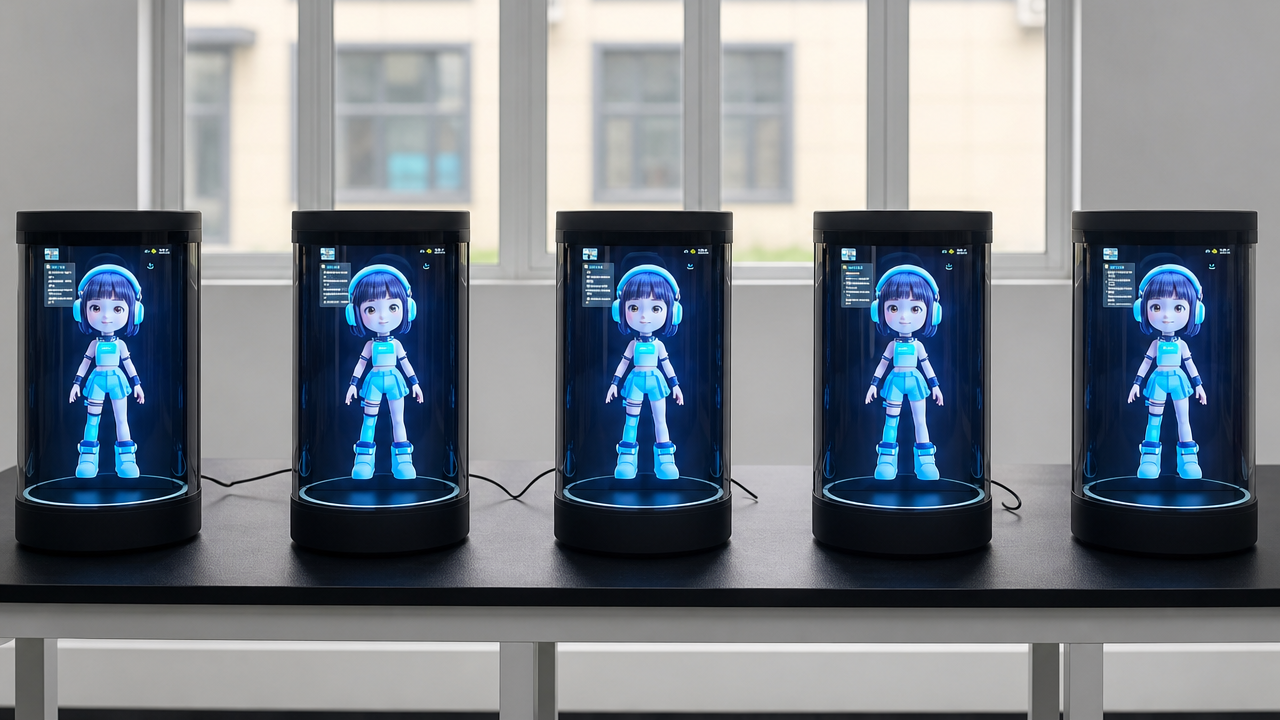
An 86-inch AI HoloBox delivers a life-size, interactive digital human presence in lobbies and reception areas — but only when the site, network, and compliance groundwork is laid before the unit arrives. This AI digital human display deployment planning guide walks AV integrators, venue operations managers, and procurement leads through the pre-installation decisions that determine whether a pilot succeeds or stalls.
What an AI HoloBox digital human display is (and is not)
An AI HoloBox digital human display is a self-contained enclosure housing a transparent LCD panel, speakers, and an interactive touchscreen overlay that together project a life-size, AI-driven digital human capable of real-time conversation. The commercial deployment category addressed in this guide is the 86-inch, 4K (4096 × 3840 pixels) floor-standing unit standing 206 cm tall, 140 cm wide, and 60 cm deep — designed for bank lobbies, hotel receptions, and government service counters [4].
Teams comparing implementation options can also consult Industrial Touch Monitor Selection Guide: Optical Bonding, Sunlight Readability & Wide-Temperature Design · Wintouch.
This is not a desktop novelty. A separate 6-inch desktop companion product exists — 3.6 inches square and 8.3 inches tall — built for personal desk use, not public deployment [3]. The two share a product name but serve entirely different environments. This guide covers only the life-size commercial unit intended for high-traffic public spaces.
Site survey: what to assess before specifying
A life-size holographic display site planning assessment prevents the most common deployment failures: units that cannot fit through doorways, floors that cannot bear the load, and positions where foot traffic blocks the viewing angle. Walk the site with these checks:
- Floor loading: Verify the floor can support the cabinet’s concentrated weight at its 60 cm × 140 cm footprint. Older raised-access flooring in government buildings may need reinforcement.
- Clearances: Allow a minimum 1.5-metre radius around the unit’s 206 cm × 140 cm × 60 cm envelope for audience viewing and service access. The holographic effect degrades when viewers stand closer than 1 metre.
- Access route: Measure every doorway, corridor turn, and lift car the unit must pass through. The 206 cm height requires standard double-door clearance; most single doors are too narrow for the 60 cm depth when tilted.
- Electrical point: Position a dedicated outlet within 2 metres of the planned location. The unit draws less than 40W operational [4], but a dedicated circuit avoids nuisance tripping from shared loads.
- Foot-traffic flow: Place the unit where approaching visitors see the digital human face-on, not in a narrow corridor where only a side-angle view is possible. Avoid positioning directly in the path of queuing lines where the cabinet becomes an obstacle.
Ambient light management for holographic visibility
The AI HoloBox uses reflective light-field holographic technology — not emissive LED — which means the transparent LCD holographic display relies on controlled internal illumination to create depth. Strong overhead downlights, unfiltered window sunlight, or polished floor reflections washing across the panel surface reduce perceived holographic contrast and can wash out the digital human entirely.
Practical mitigations:
- Position the unit so its display face is perpendicular to the brightest light source, not directly facing it.
- In atriums and glass-walled lobbies, install retractable shades or UV-filter film on windows within a 5-metre line of sight to the unit.
- Replace spot downlights directly above the planned position with diffused or indirect fixtures.
- Request an on-site demo with the holographic display system under the venue’s actual lighting conditions before finalising the location — what looks acceptable on a specification sheet may fail under a bank of 4000K lobby fixtures.
Network and bandwidth for real-time AI rendering
Pre-recorded holographic content — a CEO message, a product explainer loop — runs entirely offline with no network dependency. Real-time conversational AI is different: the digital human’s speech recognition, language model inference, and response generation depend on a stable, low-latency connection to cloud AI services.
| Connectivity | Suitability | Notes |
|---|---|---|
| Wired Ethernet | Best | Recommended for fixed installations; provides consistent sub-50ms latency for natural conversation pacing |
| WiFi (802.11ac or better) | Acceptable with validation | Site-survey the RSSI at the unit’s position; signals below -67 dBm cause perceptible response lag |
| 4G cellular | Fallback only | Suitable as backup; latency variability above 100ms creates awkward conversational pauses |
Minimum recommendation: 5 Mbps dedicated upstream and downstream bandwidth per unit, with latency under 50ms to the AI service endpoint. Run a 24-hour jitter test at the installation position before committing to a WiFi-only deployment. The AI hologram display network bandwidth requirements are modest by streaming video standards, but conversational AI is latency-sensitive in ways that buffered video playback is not.
Content management and updating the digital human
Once the AI HoloBox is physically installed, the digital human display venue preparation shifts to content operations. Follow this sequence:
- Centralise content management: Use the vendor’s cloud platform to manage all units from a single dashboard. The IDFC First Bank deployment demonstrated that a recorded brand ambassador message can be pushed to multiple branch units simultaneously from one control point [4].
- Record once, deploy everywhere: Pre-recorded leadership messages and service scripts are produced once and distributed across the fleet — no per-unit recording sessions needed. This suits hotel chains where the same AI concierge display greets guests across 30 properties, as demonstrated in the CIC Hospitality rollout across Scandinavia [1].
- Schedule updates during low-traffic windows: Push new content, language packs, or AI model updates overnight or during known quiet periods. Confirm the vendor’s platform supports scheduled deployments across time zones if your fleet spans multiple regions.
- Validate each unit post-update: Assign a local staff member to confirm the digital human display enclosure powers on, loads the updated content, and responds to a test interaction after each scheduled push.
Privacy and compliance for customer-facing AI
Holobox bank branch deployment considerations go beyond AV integration and into regulated territory. Financial institutions and government agencies must resolve privacy and data-handling questions before procurement sign-off — not after the unit is on the loading dock.
If the digital human captures any interaction data — voice transcripts, touchscreen inputs, session logs — the deployment triggers data-protection obligations. Banks should confirm whether conversational AI sessions constitute customer financial records under their jurisdiction’s retention and protection rules. Government counters must assess whether citizen interactions with an AI avatar create discoverable records subject to freedom-of-information requests.
Practical steps during procurement:
- Request the vendor’s data-processing addendum, penetration-test summary, and SOC 2 or equivalent audit report as part of the RFP response, not post-contract.
- Determine whether the AI inference runs on the vendor’s cloud, your private tenant, or on-device — this changes the data-residency and risk profile materially.
- If the unit records interactions, place a visible notice adjacent to the display — not buried in a terms screen — stating what is captured and why.
- Have your compliance officer review the deployment against sector-specific requirements before the pilot. This guide identifies general considerations; it does not substitute for legal review.
Maintenance access and service planning
The 4K holographic display enclosure is a commercial appliance, not a set-it-and-forget-it installation. Plan service access from day one:
- Service doors: Confirm the cabinet provides front or rear access to internal components without requiring the unit to be moved from its installed position. A unit positioned against a wall needs front-serviceable design.
- Spare-part lead times: Request the vendor’s spare-part list, MTBF estimates, and regional availability. A failed power supply with a six-week lead time means a dead unit in your lobby for a month.
- Remote diagnostics: Verify the vendor’s platform provides remote health monitoring — uptime, component status, connection quality — so support can begin troubleshooting before a technician is dispatched.
- Transparent LCD panel cleaning: The panel collects fingerprints and dust in public settings. Use only manufacturer-specified cleaning solutions; ammonia-based glass cleaners damage anti-reflective coatings. Schedule daily wipe-downs in high-touch environments.
- Planned downtime: In 24-hour hotel lobbies and transport hubs, schedule firmware updates and deep cleaning during the lowest-traffic hour. Communicate the window to front-desk staff so they can direct guests to alternative service points.
Deployment planning FAQ
How much floor space does an 86-inch HoloBox really need? The cabinet footprint is 140 cm × 60 cm, but plan for a total zone of approximately 3.5 m × 3 m to accommodate the 1.5-metre viewing radius, service access, and foot-traffic flow around the unit.
Teams comparing implementation options can also consult wintouchtech.com.
Can it work over WiFi, or does it need a cable? Pre-recorded content runs offline with no connection at all. Real-time conversational AI works over WiFi if the signal strength is strong and latency is stable, but wired Ethernet remains the recommendation for permanent installations where natural conversational pacing matters.
Will lobby lighting ruin the holographic effect? Strong direct light on the panel face does reduce visibility. The reflective light-field technology depends on controlled internal illumination. Window shades, indirect fixture placement, and on-site testing under actual conditions mitigate this — it is a solvable site-design problem, not a technology limitation.
How is this different from a large video screen showing a person? A video screen displays a flat image on an opaque surface. The HoloBox uses a transparent LCD panel with reflective light-field technology to create the illusion of a person standing inside the enclosure with depth and presence — and when AI-driven, the digital human converses in real time rather than playing a fixed recording [2]. The deployment planning difference is that lighting, viewing angle, and network latency affect a HoloBox in ways they do not affect a standard digital signage panel.
Content reviewed: 2026-08-04.
Evidence confidence
Confidence: Medium. This rating reflects cross-checking 4 sources across 4 independent domains. It measures evidence coverage, not certainty; verify safety-critical work against manufacturer instructions and local requirements.
References
APA 7th edition
- ↑Holoconnects. (n.d.). CIC Hospitality, 30 hotels in Scandinavia. Retrieved August 4, 2026, from https://holoconnects.com/cases/the-holobox-deployed-at-cic-hospitalitys-30-hotels-in-scandinavia.
- ↑Panashi. (2026). AI-powered Holographic Avatars The Hotel Check-in. https://panashi.ae/ai-powered-holographic-avatars-the-hotel-check-in-innovation/.
- ↑Aiholobox. (n.d.). AI HoloBox. Retrieved August 4, 2026, from https://www.aiholobox.com/.
- ↑Cited 3 timesLife-Sized Holographic Display. (n.d.). HoloBox. Retrieved August 4, 2026, from https://cdn.prod.website-files.com/63711bc40ce0bd4e874070a3/69d4c7d75278eebed82cef28_HoloBox%207th%20April.pdf.
Related reading
You should also read:
On-Device vs Cloud AI Compute for Self-Service Kiosks: A Latency and Deployment Decision Framework
On-Device Vs Cloud Ai Compute For Self-Service Kiosks is the decision framework examined in this guide. The sections below turn sourced evidence into practical comparison criteria without overstating what the available research can prove. The on-device vs cloud AI compute decision for self-service kiosks comes…
Continue reading...
SoC Choice for AI Digital-Human Displays: Balancing Compute Headroom Against Memory Cost
Why the SoC and memory choice decides whether your AI display runs on-device The SoC choice for AI digital-human displays comes down to one trade: how much compute headroom you buy against how much you pay for the memory that feeds it. A conversational AI…
Continue reading...
AI Digital Human Display Footprint Sizing: Mounting, Power and Enclosure Engineering
Ai Digital Human Display Footprint Sizing is the decision framework examined in this guide. The sections below turn sourced evidence into practical comparison criteria without overstating what the available research can prove. Digital human kiosk installation requirements are the steel, power and enclosure work that…
Continue reading...