
Ticketing and Registration Kiosk Specs for Non-Gaming Venues: Transit, Clinic and Service-Hall Requirements
Ticketing and registration kiosk specs for non-gaming venues come down to seven modules — queue-number dispenser, thermal ticket/receipt printer, EMV contactless NFC card reader, barcode/QR scanner, camera or ID reader, multi-language audio, and an industrial PC platform — sized around a standing user’s display and an enclosure that meets current accessibility and electrical standards.
Why Non-Gaming Ticketing and Registration Kiosks Need Their Own Spec
A non-gaming ticketing and registration kiosk is a public-service terminal whose job is to issue a place in a queue, verify an identity, or confirm a booking — not to sell an experience. Transit agencies, clinic and hospital registration desks, government service halls, libraries, and municipal offices all sit in this category, and their requirements diverge from entertainment and event ticketing in three ways: throughput is spread across a working day rather than a box-office spike, the user is often anxious or time-pressured, and the transaction frequently ends in a printed queue number rather than a paid admission.
Generic ticketing pages blend movie theaters, theme parks and arenas into one module list, which pushes event-specific peripherals — wristband printers, will-call lookup, badge stock — into specs that will never use them. Manufacturers do treat these as different problems: a restaurant self-ordering kiosk, a retail self-checkout kiosk, a hospital registration kiosk and a government public service kiosk “may look similar from the outside, but their module layout and operation logic can be very different” ([3]).

The practical consequence is a shorter, more defensible bill of materials. Below, the module set is mapped venue by venue, then converted into a test list you can put in front of a self-service kiosk OEM or ODM before signing.
Core Module Set for Public-Service Kiosks (Requirements Table)
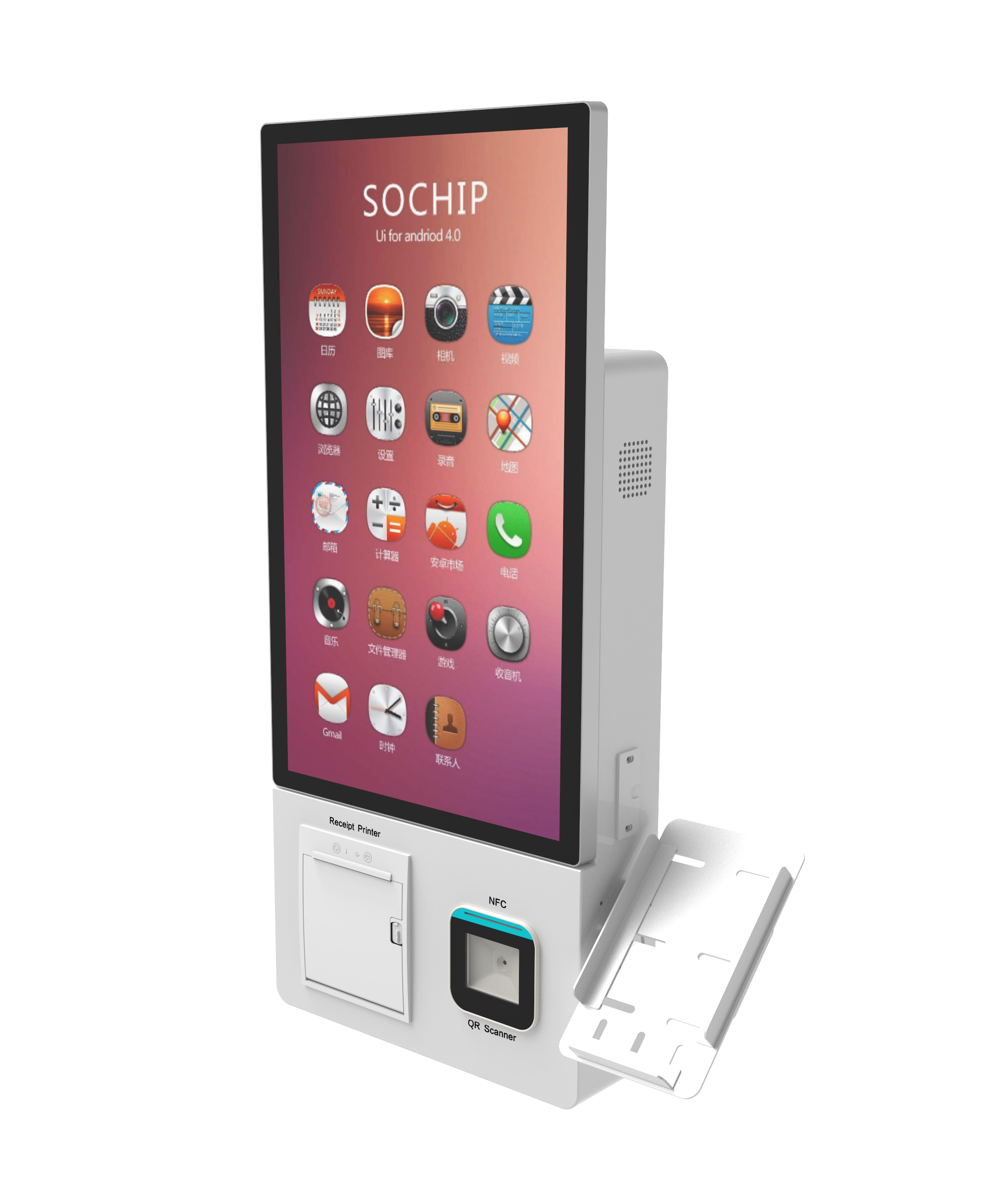
A public-service kiosk needs a queue-number ticket dispenser as its primary output device, plus a thermal printer for receipts or confirmations, an EMV contactless NFC card reader, and a barcode/QR scanner for pre-booked arrivals. The table below shows which modules a ticketing and registration kiosk actually requires per venue type, so a hospital patient registration kiosk is not quoted with event hardware it will never use.
| Module | Transit | Clinic / Registration | Service Hall | Notes |
|---|---|---|---|---|
| Queue-number ticket dispenser | Optional | Required | Required | Drives the workday, not a sales peak |
| Thermal receipt/ticket printer | Required | Required | Required | Two stock types if queue slips and receipts differ |
| EMV contactless NFC card reader | Required | Optional | Optional | Spec both contact and contactless interfaces |
| Barcode/QR scanner | Required | Required | Required | Appointment, booking or pass lookup |
| Camera and identity verification | Optional | Required | Required | Confirm retention policy before selecting |
| Speakers and multi-language prompts | Required | Required | Required | Prompt language set is part of the spec |
| Industrial PC platform (Windows/Linux/Android) | Required | Required | Required | Match OS to the backend, not the other way round |
Kiosk ticket printer and card reader integration is where most project risk sits, because the printer, cutter, dispenser and reader share a housing, a power budget and a service access route. A receipt/ticket printer on a self-service system typically sits inside the enclosure and ejects stock through a slot or ticket catch to prevent tampering ([5]) — so the slot geometry, jam-recovery access and paper path are enclosure decisions, not afterthoughts.
Choosing Compute, OS and Display for Standing Users
For a standing user, plan a display in the 21.5–27 inch class mounted at a slight upward tilt, with the touch zone in the 900–1,300 mm height band so the reach range stays compliant for seated and shorter users as well. Kiosk-buyers referencing transit ticket vending kiosk specs should verify the height, tilt and reach band against the current applicable accessibility standard and local jurisdiction rather than copying a number from a quote.
- Windows: widest driver and peripheral support, strongest fit where the kiosk must hand off to an existing HIS, queue-management, ERP or visitor system.
- Android: lower platform cost and simpler remote management, but check that your printer, dispenser and card reader have maintained drivers.
- Linux: predictable long-run behavior for unattended units, at the cost of a narrower vendor support pool.
- Extended-lifecycle industrial PC with soldered-down or socketed memory, SSD storage, and a documented multi-year availability window.
- Modular enclosure design so display, printer and reader can be replaced without re-cutting sheet metal.
Compute choice only becomes a specification problem when the terminal does on-device work — face matching, document capture or prompt translation. If that applies, the trade-offs are covered in on-device vs cloud AI compute for self-service kiosks and edge AI NPU compute sizing for kiosks.
Cash Handling vs Card and NFC Only: A Decision Rule
Most public-service deployments can drop cash handling, and the rule for keeping it is narrow: include cash only when a documented share of your audience is unbanked, or when the terminal takes small amounts at high frequency. Otherwise an EMV contactless NFC card reader keeps maintenance and security scope small.
The maintenance argument is well established. Ticket printers, card readers and scanners now dominate ticketing kiosk designs, and while some solutions still accept cash, “more are moving away from this type of solution due to maintenance requirements and security concerns” ([5]). Cash handling and cashless payment kiosks therefore differ less in user-facing features than in bill validators, hoppers, coin recycling, cash-in-transit procedures and service visit frequency.
Apply the rule in this order:
- Ask whether any material share of the audience cannot pay by card — documented evidence, not assumption.
- If yes, specify cash as a module with a stated maintenance interval and a secure collection path.
- If no, spec contact and contactless card plus QR, and note that cash can be retrofitted later.
- Payment expectations vary by location, so treat a downtown transit line and a rural stop as separate cases ([2]).
Accessibility and Enclosure Requirements
Treat accessibility as a set of criteria to verify, not a checkbox. An ADA compliant ticketing kiosk enclosure is one that demonstrably meets the reach range and knee or forward-approach clearance in the standard version your jurisdiction enforces, which is why a spec should name the standard and the verification method rather than quoting a single height.
- Confirm maximum reach height, minimum reach height and forward approach clearance against the current applicable standard and local code.
- Confirm a wheelchair-approach path with knee clearance if the terminal is intended to serve seated users.
- Set screen angle and pedestal height for standing users separately from seated approach, rather than splitting the difference.
- Specify a 16-gauge steel enclosure with a keyed or locked service access panel for unattended duty.
- For transit halls and outdoor placements, state vandal resistance, coat finish and the ingress condition the enclosure must survive.
- Require that all electrical components be tested and compliant with applicable UL and FCC standards, as a baseline commercial-grade configuration does ([4]).
Pre-Acceptance Test Checklist for a Custom Kiosk Order
A kiosk acceptance testing checklist should be agreed before the sample ships, and it should test the queue-number output, the payment path, the accessible reach envelope and the backend handshake — not just the boot screen. For a custom self-service kiosk OEM or ODM order, this is the list to attach to the purchase order; the same requirements feed a broader procurement document, as the ticketing and queue kiosk hardware requirements spec template sets out.
- Queue-number print legibility and successful take-away on the first attempt.
- Receipt/ticket printer duty cycle run at the specified daily volume, plus jam recovery without opening the enclosure.
- EMV and NFC read reliability across contact cards, contactless cards and phone wallets, repeated per transaction type.
- ADA reach range and knee/forward-approach clearance measured on the delivered unit, not just on the drawing.
- Unattended 24/7 soak test covering reboot, network loss and printer-out-of-stock states.
- Enclosure lock and service access verified, with keys and access procedure handed over.
- Software/backend handshake to the HIS, queue system or booking platform, including failure handling.
- Multi-language prompt verification across every configured language, including audio.
- Packaging, BOM and accessory completeness against the order.
- Return-to-depot warranty scope confirmed in writing, along with the covered component list.
Time-and-material details, duty-cycle numbers and payment mix cannot be confirmed generically — they vary by venue, and your supplier should validate them against your own traffic data.
Turning the Spec Into a Quote or Tender
Hand a manufacturer this document and you should get a comparable quote, because every line maps to a testable requirement rather than a description. Complete a ticketing and registration kiosk specs for package by attaching a scenario, a flow, and the module list above, and you remove most of the ambiguity that turns quotes into revisions.
Send these to your supplier:
- Application scenario and venue type (transit, clinic, service hall)
- User flow from arrival to confirmed output
- Required modules, marked required or optional
- Payment needs, including whether cash is in scope
- Printing needs — queue slips, receipts, or both
- Software notes, including the backend the unit must talk to
- Installation environment and mounting method
- Branding plan, covering logo, colour and finish
Custom OEM/ODM kiosk projects typically move forward only after the buyer has reviewed kiosk form, required modules, appearance direction, packaging needs and system-related requirements ([3]), and manufacturers commonly offer configurable module sets — industrial PC platforms, ticket and receipt printing, barcode and QR scanning, and payment modules inside engineered enclosures — as the standard basis for a custom build ([1]). Where a public-service terminal also has to read documents or verify identity on-device, size the compute as part of the same spec rather than bolting it on later; the AI accelerator sizing trade-offs are covered in kiosk AI accelerator sizing: compute headroom vs cost.
Content reviewed: 2026-09-14.
Evidence confidence
Confidence: Medium. This rating reflects cross-checking 5 sources across 4 independent domains. It measures evidence coverage, not certainty; verify safety-critical work against manufacturer instructions and local requirements.
References
APA 7th edition
- ↑Bestkiosk. (n.d.). Ticketing Kiosk | OEM Self-Service | BestKiosk. Retrieved September 14, 2026, from https://www.bestkiosk.com/ticketing-kiosk/.
- ↑Bestkiosk. (2026). Ticketing Kiosks: Speed, Security & Access | bestkiosk. https://www.bestkiosk.com/ticketing-kiosks-transit-events-speed-security-accessibility/.
- ↑Cited 2 timesSmart Payment & Ordering. (n.d.). Self-Service Kiosk Manufacturer. Retrieved September 14, 2026, from https://ikinor-interactive.com/self-service-kiosk/.
- ↑Advancedkiosks. (n.d.). Ticketing Self-Service Kiosk- Advanced Kiosks. Retrieved September 14, 2026, from https://advancedkiosks.com/kiosks/ticketing-kiosk.
- ↑Cited 2 timesKiosk Group. (n.d.). Ticketing Kiosks 101. Retrieved September 14, 2026, from https://www.kioskgroup.com/pages/ticketing-kiosks-101.
You should also read:
Ticketing and Queue Kiosk Hardware Requirements: A Spec Template for Transit, Clinic and Service Halls
Ticketing and queue kiosk hardware requirements come down to five decisions: the task the user completes, whether a printer is needed, what the scanner or reader must cover, how the unit is mounted, and how a technician reaches the consumables. Settle those in order and…
Continue reading...
Edge AI NPU Sizing for Voice-Activated Kiosks
Edge AI NPU sizing for voice-activated kiosks starts with your voice workload, not a headline TOPS number: a single-unit pilot needs roughly 3-30 TOPS depending on whether it only listens for a wake word or runs full local speech recognition. The rest is RAM, storage,…
Continue reading...
Edge-AI vs Cloud on Rugged Mobile vs Fixed Kiosks: Sizing On-Device Compute Across the 2026 Device Mix
For a 2026 kiosk fleet, the Edge-AI vs Cloud on Rugged Mobile vs Fixed Kiosks decision lands differently per form factor: run low-latency, privacy-sensitive inference on-device as the default, and push only heavy, rare workloads to the cloud. The gating line is roughly a 500M-parameter…
Continue reading...